git clone https://github.com/openclaw/openclaw.git
cd openclaw
./docker-setup.sh
🦞 OpenClaw 2026.2.25 (unknown) — I'll refactor your busywork like it owes me money.

▄▄▄▄▄▄▄▄▄▄▄▄▄▄▄▄▄▄▄▄▄▄▄▄▄▄▄▄▄▄▄▄▄▄▄▄▄▄▄▄▄▄▄▄▄▄▄▄▄▄▄▄
██░▄▄▄░██░▄▄░██░▄▄▄██░▀██░██░▄▄▀██░████░▄▄▀██░███░██
██░███░██░▀▀░██░▄▄▄██░█░█░██░█████░████░▀▀░██░█░█░██
██░▀▀▀░██░█████░▀▀▀██░██▄░██░▀▀▄██░▀▀░█░██░██▄▀▄▀▄██
▀▀▀▀▀▀▀▀▀▀▀▀▀▀▀▀▀▀▀▀▀▀▀▀▀▀▀▀▀▀▀▀▀▀▀▀▀▀▀▀▀▀▀▀▀▀▀▀▀▀▀▀
                  🦞 OPENCLAW 🦞

┌  OpenClaw onboarding
│
◇  Security ──────────────────────────────────────────────────────────────────────────────╮
│                                                                                         │
│  Security warning — please read.                                                        │
│                                                                                         │
│  OpenClaw is a hobby project and still in beta. Expect sharp edges.                     │
│  This bot can read files and run actions if tools are enabled.                          │
│  A bad prompt can trick it into doing unsafe things.                                    │
│                                                                                         │
│  If you’re not comfortable with basic security and access control, don’t run OpenClaw.  │
│  Ask someone experienced to help before enabling tools or exposing it to the internet.  │
│                                                                                         │
│  Recommended baseline:                                                                  │
│  - Pairing/allowlists + mention gating.                                                 │
│  - Sandbox + least-privilege tools.                                                     │
│  - Keep secrets out of the agent’s reachable filesystem.                                │
│  - Use the strongest available model for any bot with tools or untrusted inboxes.       │
│                                                                                         │
│  Run regularly:                                                                         │
│  openclaw security audit --deep                                                         │
│  openclaw security audit --fix                                                          │
│                                                                                         │
│  Must read: https://docs.openclaw.ai/gateway/security                                   │
│                                                                                         │
├─────────────────────────────────────────────────────────────────────────────────────────╯
│
◆  I understand this is powerful and inherently risky. Continue?
│  ● Yes / ○ No
└

◇  Model/auth provider
│  OpenAI
│
◇  OpenAI auth method
│  Back
│
◇  Model/auth provider
│  vLLM
│
◇  vLLM base URL
│  https://dashscope.aliyuncs.com/compatible-mode/v1
│
◆  vLLM API key
│  sk-sp-xxxxxxxxxxxxx
如果报错 Error: EACCES: permission denied, mkdir '/home/node/.openclaw/agents/main/agent'
则执行
sudo chown -R 1000:1000 "${OPENCLAW_CONFIG_DIR:-$HOME/.openclaw}"
sudo chown -R 1000:1000 "${OPENCLAW_WORKSPACE_DIR:-$HOME/.openclaw/workspace}"
docker compose restart
root@momoserver:/mnt/data/openclaw# sudo chown -R 1000:1000 "${OPENCLAW_CONFIG_DIR:-$HOME/.openclaw}"
sudo chown -R 1000:1000 "${OPENCLAW_WORKSPACE_DIR:-$HOME/.openclaw/workspace}"
docker compose restart
WARN[0000] The "CLAUDE_AI_SESSION_KEY" variable is not set. Defaulting to a blank string.
WARN[0000] The "CLAUDE_WEB_SESSION_KEY" variable is not set. Defaulting to a blank string.
WARN[0000] The "CLAUDE_WEB_COOKIE" variable is not set. Defaulting to a blank string.
WARN[0000] The "CLAUDE_AI_SESSION_KEY" variable is not set. Defaulting to a blank string.
WARN[0000] The "CLAUDE_WEB_SESSION_KEY" variable is not set. Defaulting to a blank string.
WARN[0000] The "CLAUDE_WEB_COOKIE" variable is not set. Defaulting to a blank string.
[+] Restarting 1/1
 ✔ Container openclaw-openclaw-gateway-1  Started
全部输出如下:
🦞 OpenClaw 2026.2.25 (unknown) — If it works, it's automation; if it breaks, it's a "learning opportunity." ▄▄▄▄▄▄▄▄▄▄▄▄▄▄▄▄▄▄▄▄▄▄▄▄▄▄▄▄▄▄▄▄▄▄▄▄▄▄▄▄▄▄▄▄▄▄▄▄▄▄▄▄ ██░▄▄▄░██░▄▄░██░▄▄▄██░▀██░██░▄▄▀██░████░▄▄▀██░███░██ ██░███░██░▀▀░██░▄▄▄██░█░█░██░█████░████░▀▀░██░█░█░██ ██░▀▀▀░██░█████░▀▀▀██░██▄░██░▀▀▄██░▀▀░█░██░██▄▀▄▀▄██ ▀▀▀▀▀▀▀▀▀▀▀▀▀▀▀▀▀▀▀▀▀▀▀▀▀▀▀▀▀▀▀▀▀▀▀▀▀▀▀▀▀▀▀▀▀▀▀▀▀▀▀▀ 🦞 OPENCLAW 🦞 ┌ OpenClaw onboarding │ ◇ Security ──────────────────────────────────────────────────────────────────────────────╮ │ │ │ Security warning — please read. │ │ │ │ OpenClaw is a hobby project and still in beta. Expect sharp edges. │ │ This bot can read files and run actions if tools are enabled. │ │ A bad prompt can trick it into doing unsafe things. │ │ │ │ If you’re not comfortable with basic security and access control, don’t run OpenClaw. │ │ Ask someone experienced to help before enabling tools or exposing it to the internet. │ │ │ │ Recommended baseline: │ │ - Pairing/allowlists + mention gating. │ │ - Sandbox + least-privilege tools. │ │ - Keep secrets out of the agent’s reachable filesystem. │ │ - Use the strongest available model for any bot with tools or untrusted inboxes. │ │ │ │ Run regularly: │ │ openclaw security audit --deep │ │ openclaw security audit --fix │ │ │ │ Must read: https://docs.openclaw.ai/gateway/security │ │ │ ├─────────────────────────────────────────────────────────────────────────────────────────╯ │ ◇ I understand this is powerful and inherently risky. Continue? │ Yes │ ◇ Onboarding mode │ QuickStart │ ◇ QuickStart ─────────────────────────╮ │ │ │ Gateway port: 18789 │ │ Gateway bind: Loopback (127.0.0.1) │ │ Gateway auth: Token (default) │ │ Tailscale exposure: Off │ │ Direct to chat channels. │ │ │ ├──────────────────────────────────────╯ │ ◇ Model/auth provider │ vLLM │ ◇ vLLM base URL │ https://coding.dashscope.aliyuncs.com/v1 │ ◇ vLLM API key │ sk-sp-xxxxxxxxxxxxxxxx ◇ vLLM model │ MiniMax-M2.5 │ ◇ Model configured ───────────────────────╮ │ │ │ Default model set to vllm/MiniMax-M2.5 │ │ │ ├──────────────────────────────────────────╯ │ ◇ Default model │ Keep current (vllm/MiniMax-M2.5) │ ◇ Channel status ────────────────────────────╮ │ │ │ Telegram: needs token │ │ WhatsApp (default): not linked │ │ Discord: needs token │ │ Slack: needs tokens │ │ Signal: needs setup │ │ signal-cli: missing (signal-cli) │ │ iMessage: needs setup │ │ imsg: missing (imsg) │ │ IRC: not configured │ │ Google Chat: not configured │ │ Feishu: install plugin to enable │ │ Google Chat: install plugin to enable │ │ Nostr: install plugin to enable │ │ Microsoft Teams: install plugin to enable │ │ Mattermost: install plugin to enable │ │ Nextcloud Talk: install plugin to enable │ │ Matrix: install plugin to enable │ │ BlueBubbles: install plugin to enable │ │ LINE: install plugin to enable │ │ Zalo: install plugin to enable │ │ Zalo Personal: install plugin to enable │ │ Synology Chat: install plugin to enable │ │ Tlon: install plugin to enable │ │ │ ├─────────────────────────────────────────────╯ │ ◇ How channels work ───────────────────────────────────────────────────────────────────────╮ │ │ │ DM security: default is pairing; unknown DMs get a pairing code. │ │ Approve with: openclaw pairing approve <channel> <code> │ │ Public DMs require dmPolicy="open" + allowFrom=["*"]. │ │ Multi-user DMs: run: openclaw config set session.dmScope "per-channel-peer" (or │ │ "per-account-channel-peer" for multi-account channels) to isolate sessions. │ │ Docs: channels/pairing │ │ │ │ Telegram: simplest way to get started — register a bot with @BotFather and get going. │ │ WhatsApp: works with your own number; recommend a separate phone + eSIM. │ │ Discord: very well supported right now. │ │ IRC: classic IRC networks with DM/channel routing and pairing controls. │ │ Google Chat: Google Workspace Chat app with HTTP webhook. │ │ Slack: supported (Socket Mode). │ │ Signal: signal-cli linked device; more setup (David Reagans: "Hop on Discord."). │ │ iMessage: this is still a work in progress. │ │ Feishu: 飞书/Lark enterprise messaging with doc/wiki/drive tools. │ │ Nostr: Decentralized protocol; encrypted DMs via NIP-04. │ │ Microsoft Teams: Bot Framework; enterprise support. │ │ Mattermost: self-hosted Slack-style chat; install the plugin to enable. │ │ Nextcloud Talk: Self-hosted chat via Nextcloud Talk webhook bots. │ │ Matrix: open protocol; install the plugin to enable. │ │ BlueBubbles: iMessage via the BlueBubbles mac app + REST API. │ │ LINE: LINE Messaging API bot for Japan/Taiwan/Thailand markets. │ │ Zalo: Vietnam-focused messaging platform with Bot API. │ │ Zalo Personal: Zalo personal account via QR code login. │ │ Synology Chat: Connect your Synology NAS Chat to OpenClaw with full agent capabilities. │ │ Tlon: decentralized messaging on Urbit; install the plugin to enable. │ │ │ ├───────────────────────────────────────────────────────────────────────────────────────────╯ │ ◇ Select channel (QuickStart) │ Skip for now Updated ~/.openclaw/openclaw.json Workspace OK: ~/.openclaw/workspace Sessions OK: ~/.openclaw/agents/main/sessions │ ◇ Skills status ─────────────╮ │ │ │ Eligible: 3 │ │ Missing requirements: 41 │ │ Unsupported on this OS: 7 │ │ Blocked by allowlist: 0 │ │ │ ├─────────────────────────────╯ │ ◇ Configure skills now? (recommended) │ Yes │ ◇ Install missing skill dependencies │ Skip for now │ ◇ Set GOOGLE_PLACES_API_KEY for goplaces? │ No │ ◇ Set GEMINI_API_KEY for nano-banana-pro? │ No │ ◇ Set NOTION_API_KEY for notion? │ No │ ◇ Set OPENAI_API_KEY for openai-image-gen? │ No │ ◇ Set OPENAI_API_KEY for openai-whisper-api? │ No │ ◇ Set ELEVENLABS_API_KEY for sag? │ No │ ◇ Hooks ──────────────────────────────────────────────────────────────────╮ │ │ │ Hooks let you automate actions when agent commands are issued. │ │ Example: Save session context to memory when you issue /new or /reset. │ │ │ │ Learn more: https://docs.openclaw.ai/automation/hooks │ │ │ ├──────────────────────────────────────────────────────────────────────────╯ │ ◇ Enable hooks? │ Skip for now Config overwrite: /home/node/.openclaw/openclaw.json (sha256 5662ede8e8a6ceb829a04a720fce8b059b07fb0402f71520943ae15defcf5141 -> 0d597e9b2c3fc953afb49678c601ca8010e205cc9492db994275763f27483256, backup=/home/node/.openclaw/openclaw.json.bak) │ ◇ Systemd ───────────────────────────────────────────────────────────────────────────────╮ │ │ │ Systemd user services are unavailable. Skipping lingering checks and service install. │ │ │ ├─────────────────────────────────────────────────────────────────────────────────────────╯ │ ◇ Health check failed: gateway closed (1006 abnormal closure (no close frame)): no close reason Gateway target: ws://127.0.0.1:18789 Source: local loopback Config: /home/node/.openclaw/openclaw.json Bind: loopback │ ◇ Health check help ────────────────────────────────╮ │ │ │ Docs: │ │ https://docs.openclaw.ai/gateway/health │ │ https://docs.openclaw.ai/gateway/troubleshooting │ │ │ ├────────────────────────────────────────────────────╯ │ ◇ Optional apps ────────────────────────╮ │ │ │ Add nodes for extra features: │ │ - macOS app (system + notifications) │ │ - iOS app (camera/canvas) │ │ - Android app (camera/canvas) │ │ │ ├────────────────────────────────────────╯ │ ◇ Control UI ───────────────────────────────────────────────────────────────────────────────╮ │ │ │ Web UI: http://127.0.0.1:18789/ │ │ Web UI (with token): │ │ http://127.0.0.1:18789/#token=xxxxxxxxxxxxxxxxxxxxxxxx │ │ Gateway WS: ws://127.0.0.1:18789 │ │ Gateway: not detected (gateway closed (1006 abnormal closure (no close frame)): no close │ │ reason) │ │ Docs: https://docs.openclaw.ai/web/control-ui │ │ │ ├────────────────────────────────────────────────────────────────────────────────────────────╯ │ ◇ Workspace backup ────────────────────────────────────────╮ │ │ │ Back up your agent workspace. │ │ Docs: https://docs.openclaw.ai/concepts/agent-workspace │ │ │ ├───────────────────────────────────────────────────────────╯ │ ◇ Security ──────────────────────────────────────────────────────╮ │ │ │ Running agents on your computer is risky — harden your setup: │ │ https://docs.openclaw.ai/security │ │ │ ├─────────────────────────────────────────────────────────────────╯ │ ◇ Shell completion ───────────────────────────────────────────────────────╮ │ │ │ Shell completion installed. Restart your shell or run: source ~/.zshrc │ │ │ ├──────────────────────────────────────────────────────────────────────────╯ │ ◇ Dashboard ready ────────────────────────────────────────────────────────────────╮ │ │ │ Dashboard link (with token): │ │ http://127.0.0.1:18789/#token=xxxxxxxxxxxx │ │ Copy/paste this URL in a browser on this machine to control OpenClaw. │ │ No GUI detected. Open from your computer: │ │ ssh -N -L 18789:127.0.0.1:18789 user@<host> │ │ Then open: │ │ http://localhost:18789/ │ │ http://localhost:18789/#token=xxxxxxxxxxxxx │ │ Docs: │ │ https://docs.openclaw.ai/gateway/remote │ │ https://docs.openclaw.ai/web/control-ui │ │ │ ├──────────────────────────────────────────────────────────────────────────────────╯ │ ◇ Web search (optional) ─────────────────────────────────────────────────────────────────╮ │ │ │ If you want your agent to be able to search the web, you’ll need an API key. │ │ │ │ OpenClaw uses Brave Search for the `web_search` tool. Without a Brave Search API key, │ │ web search won’t work. │ │ │ │ Set it up interactively: │ │ - Run: openclaw configure --section web │ │ - Enable web_search and paste your Brave Search API key │ │ │ │ Alternative: set BRAVE_API_KEY in the Gateway environment (no config changes). │ │ Docs: https://docs.openclaw.ai/tools/web │ │ │ ├─────────────────────────────────────────────────────────────────────────────────────────╯ │ ◇ What now ─────────────────────────────────────────────────────────────╮ │ │ │ What now: https://openclaw.ai/showcase ("What People Are Building"). │ │ │ ├────────────────────────────────────────────────────────────────────────╯ │ └ Onboarding complete. Use the dashboard link above to control OpenClaw. ==> Provider setup (optional) WhatsApp (QR): docker compose -f /mnt/data/openclaw/docker-compose.yml run --rm openclaw-cli channels login Telegram (bot token): docker compose -f /mnt/data/openclaw/docker-compose.yml run --rm openclaw-cli channels add --channel telegram --token <token> Discord (bot token): docker compose -f /mnt/data/openclaw/docker-compose.yml run --rm openclaw-cli channels add --channel discord --token <token> Docs: https://docs.openclaw.ai/channels ==> Starting gateway WARN[0000] The "CLAUDE_AI_SESSION_KEY" variable is not set. Defaulting to a blank string. WARN[0000] The "CLAUDE_WEB_SESSION_KEY" variable is not set. Defaulting to a blank string. WARN[0000] The "CLAUDE_WEB_COOKIE" variable is not set. Defaulting to a blank string. WARN[0000] The "CLAUDE_WEB_COOKIE" variable is not set. Defaulting to a blank string. WARN[0000] The "CLAUDE_AI_SESSION_KEY" variable is not set. Defaulting to a blank string. WARN[0000] The "CLAUDE_WEB_SESSION_KEY" variable is not set. Defaulting to a blank string. [+] Running 1/1 ✔ Container openclaw-openclaw-gateway-1 Started 0.8s Gateway running with host port mapping. Access from tailnet devices via the host's tailnet IP. Config: /root/.openclaw Workspace: /root/.openclaw/workspace Token: a93d914d344041d72bcac7f20a3bb6ed07fad1092315303aa758846858153918 Commands: docker compose -f /mnt/data/openclaw/docker-compose.yml logs -f openclaw-gateway docker compose -f /mnt/data/openclaw/docker-compose.yml exec openclaw-gateway node dist/index.js health --token "a93d914d344041d72bcac7f20a3bb6ed07fad1092315303aa758846858153918" root@momoserver:/mnt/data/openclaw#
出现端口未占用且重启,请加入controlUi内容,请勿用于生产环境,相关issue查看https://github.com/openclaw/openclaw/issues/25009
日志请看docker compose -f /mnt/data/openclaw/docker-compose.yml logs -f openclaw-gateway
vim /root/.openclaw/openclaw.json
  "gateway": {
    "port": 18789,
    "mode": "local",
    "bind": "loopback",
    "controlUi": {
        "allowInsecureAuth": true,
        "dangerouslyDisableDeviceAuth": true,
        "dangerouslyAllowHostHeaderOriginFallback": true
    },
    "auth": {
      "mode": "token",
      "token": "b6ad73df8130e004c509d2485b9183bc99ac030352990a53"
    },
    "tailscale": {
      "mode": "off",
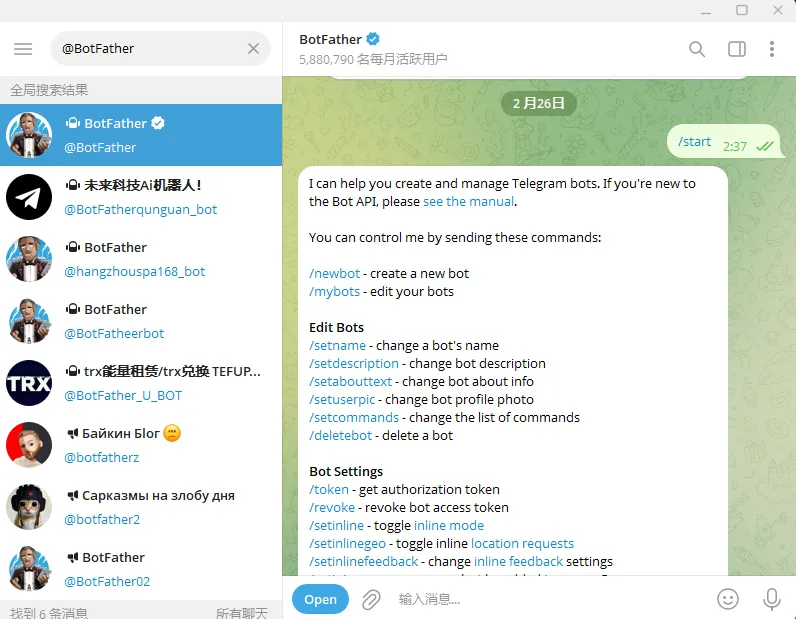
然后放行tg id
docker exec -it openclaw-openclaw-gateway-1 npm run openclaw -- pairing list telegram
Pairing requests (1)
┌──────────┬────────────────┬────────────────────────────────────────────────────────────────┬──────────────────────────┐
│ Code     │ telegramUserId │ Meta                                                           │ Requested                │
├──────────┼────────────────┼────────────────────────────────────────────────────────────────┼──────────────────────────┤
│ xxxx     │ xxxx           │ {"username":"xxxx","firstName":"mo","lastName":"mo","ac     │ 2026-02-25T19:12:48.619Z │
│          │                │ countId":"default"}                                            │                          │
└──────────┴────────────────┴────────────────────────────────────────────────────────────────┴──────────────────────────┘
https://docs.openclaw.ai/channels/pairing#where-the-state-lives
root@momoserver:~# docker exec -it openclaw-openclaw-gateway-1 npm run openclaw pairing approve telegram xxxx

> [email protected] openclaw
> node scripts/run-node.mjs pairing approve telegram J8DGXE5R


🦞 OpenClaw 2026.2.25 (unknown) — Ah, the fruit tree company! 🍎

Approved telegram sender 718258729.
本文作者:墨洺的文档
本文链接:
版权声明:本博客所有文章除特别声明外,均采用 BY-NC-SA 许可协议。转载请注明出处!