目录
https://docs.nextcloud.com/server/18/admin_manual/installation/server_tuning.html
Tune PHP-FPM
调整PHP-FPM
If you are using a default installation of php-fpm you might have noticed excessive load times on the web interface or even sync issues. This is due to the fact that each simultaneous request of an element is handled by a separate PHP-FPM process. So even on a small installation you should allow more processes to run. For example on a machine with 4GB of RAM and 1GB of MySQL cache following values in your www.conf file should work:

pm = dynamic
pm.max_children = 120
pm.start_servers = 12
pm.min_spare_servers = 6
pm.max_spare_servers = 18
Depending on your current PHP version you should find this file e.g. under /etc/php/7.2/fpm/pool.d/www.conf
原文指出要调整PHP-FPM
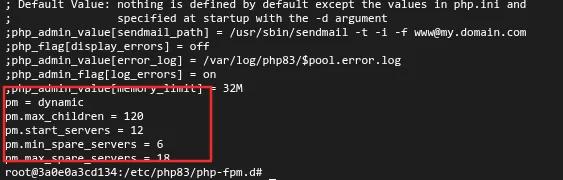
针对1panel,我们需要做一些修改。
bashroot@3a0e0a3cd134:/# cd /etc/php83/
root@3a0e0a3cd134:/etc/php83# ls
conf.d  php-fpm.conf  php-fpm.d  php.ini
root@3a0e0a3cd134:/etc/php83# cd php-fpm.d/
root@3a0e0a3cd134:/etc/php83/php-fpm.d# cat www.conf
在末尾加入这些文本,然后重启容器即可
本文作者:墨洺的文档
本文链接:
版权声明:本博客所有文章除特别声明外,均采用 BY-NC-SA 许可协议。转载请注明出处!
目录